01 / TOO MUCH PAPER
Scanning every page can consume the budget
It can delay the transition without improving the day-to-day workflow.
Smart Clinic Systems helps Ontario physicians move from paper records or disconnected legacy systems into a practical digital workflow. We establish the patient-data foundation, prepare EMR-compatible import files, modernize telephone and fax workflows, connect appointment communications and selectively digitize the clinical information that matters most.
The objective is not to scan the most paper. It is to get your new practice working safely, efficiently and affordably.
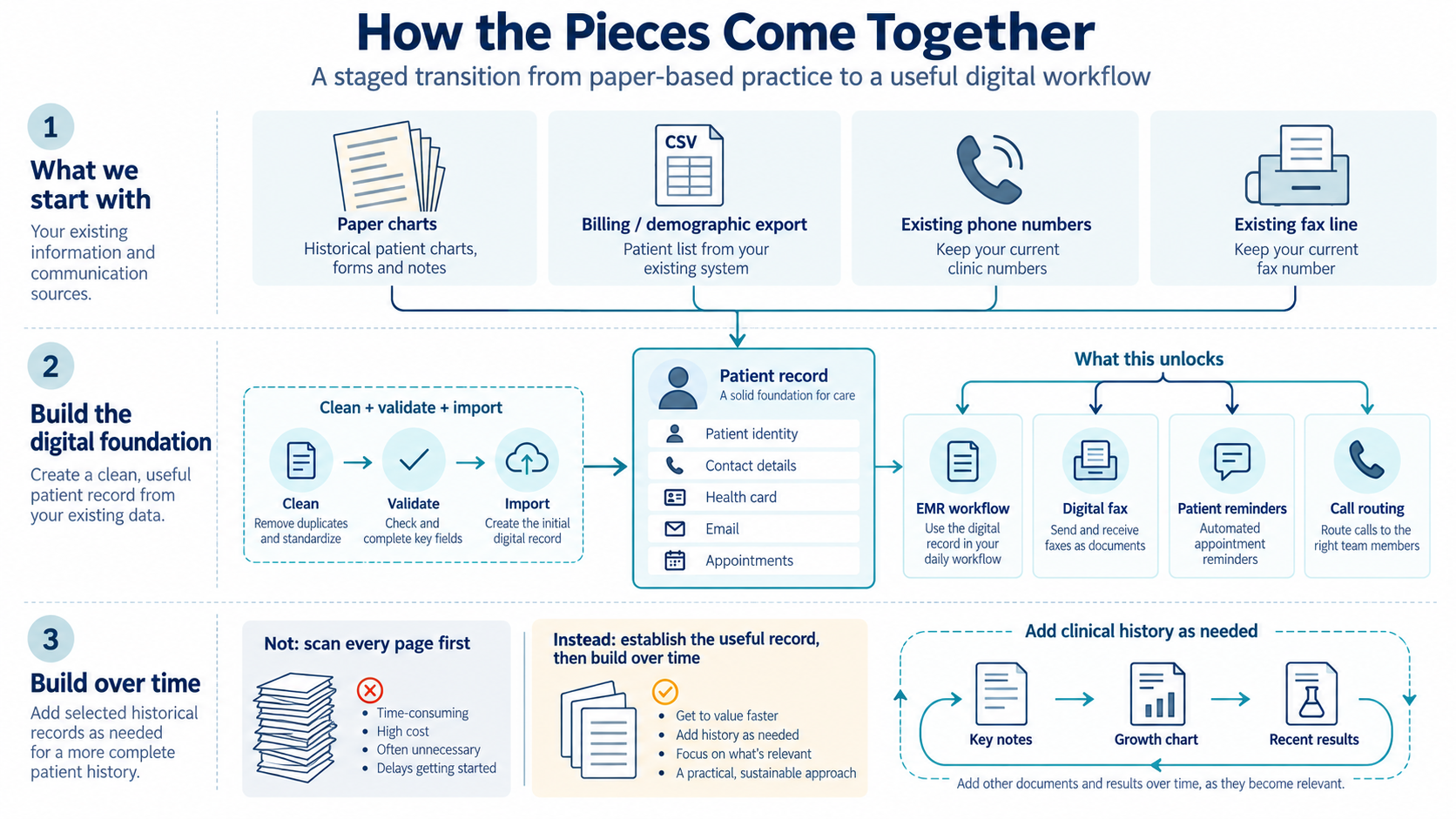
A physician moving from a paper-based office may have hundreds or thousands of patient charts, years of handwritten notes and a separate billing system containing useful demographic information.
Scanning everything can be expensive, slow and clinically unhelpful. A 100-page paper chart imported as one large PDF may technically be digital, but it is not necessarily organized, searchable or easy to use during an appointment.
It can delay the transition without improving the day-to-day workflow.
Names, health card information, telephone numbers, email addresses and billing history may not be ready for the receiving EMR.
Without redesigned telephone, fax, reminders and document handling, staff keep printing, calling and filing.
We begin with the smallest useful digital record that lets the physician and clinic team work effectively: accurate demographics, contact information and appointment capability—not an immediate scan of every historical page.
Scan every page → create large files → spend heavily before the first clinic day → ask staff to make sense of the result
Extract useful data → validate and import demographics → activate appointments and communications → selectively add clinical history → digitize new information from that point forward
Inventory charts, billing data, telephone, fax, schedules and destination systems.
Export available demographics and contact information from Accuro, billing software or spreadsheets.
Clean fields, resolve formatting problems and prepare an import-compliant file.
Create records in TELUS PS Suite or the receiving EMR and confirm booking support.
Configure digital fax, telephone routing, Ocean communications and reminders where available.
Add handwritten notes, growth charts and useful documents as patients are seen.
Exporting patient information is only part of the job. Legacy billing systems, spreadsheets and EMRs structure names, addresses, telephone numbers and health card information differently. SCS helps bridge that gap.
Determine what is available, where it resides and what can be exported responsibly. Map source fields to destination fields, including names, addresses, dates of birth and health card information where available and authorized.
Identify inconsistent dates, duplicates, blank required fields and formatting problems. Prepare TELUS PS Suite-compatible patient import files where technically appropriate.
Begin with a small test group. Review imported records before proceeding with a larger authorized batch.
Compare totals, flag exceptions and provide a clear list of records requiring manual review.
A pediatric chart may contain a concise summary, several relevant notes and a growth chart that deliver most of its immediate value. The transition may start with one to five high-value pages, then expand when a patient is booked or a clinical need is identified.
The transition delivers its greatest value when new paper stops accumulating. SCS helps design routing, configure practical workflows and train the team so digital fax becomes part of the clinical process.
Fax arrives
→ print
→ sort
→ locate chart
→ physician reviews
→ file in paper chart
Digital fax arrives
→ identify patient
→ attach to EMR chart
→ assign for review
→ document action
→ retain digitally
An EMR transition is also a telephone, fax, voicemail, patient notice and appointment-reminder transition.
Plan number porting, business-hours routing, transition greetings, extensions and voicemail responsibilities.
Move appropriate fax workflows away from paper while maintaining established clinic numbers where possible.
Use accurate demographics and scheduling data to support Ocean appointment reminders, forms and messages.
Replace routine reminder calls with automated communications where appropriate.
Document responsibilities and provide practical training for the physician and MOA.
Avoid waiting for every chart to be scanned before the physician can begin seeing patients.
Direct the initial budget toward data, systems and documents needed for the first phase.
Automate routine reminders and reduce printing, filing and manual patient calls.
Place new information in the patient’s digital chart instead of creating another paper-handling process.
Avoid oversized, poorly organized scans that are difficult to navigate.
Use structured data, integrated communications and digital growth tracking to support the clinic going forward.
The goal is not simply to remove paper. It is to redirect staff time from moving information to supporting patients and physicians.
Pediatric practices have distinctive information needs. Growth, development, age-specific forms, caregiver contact information and longitudinal follow-up all matter.
Once the patient record is established, the clinic can progressively move from a static scanned growth chart to structured measurements that the EMR can plot over time. Ocean-connected workflows may also support appointment reminders and selected questionnaires or forms before a visit, depending on the clinic’s subscriptions and configuration.
This creates a more useful longitudinal record while allowing the physician to retain access to important historical information during the transition.
Review practice, data, paper volume, phone, fax, timeline and constraints.
Convert a sample and confirm records appear correctly before scaling.
Prepare the approved dataset and configure appointments and communications.
Resolve practical issues without delaying patient care.
Attach valuable documents and refine workflows based on actual use.
This service reflects practical work supporting an Ontario consulting pediatrician moving from a predominantly paper-based practice—with Accuro used for billing—into a shared clinic using TELUS PS Suite.
The transition includes patient demographic conversion, import-file preparation, digital fax planning, telephone-line continuity, Ocean-enabled appointment communications and staged chart digitization. The work reinforced a simple principle: the fastest path to value is often not a complete historical scan, but a reliable patient-data foundation and a better workflow for every new piece of information.
See related guidance on Healthcare Workflow Improvement, Custom PS Suite Forms and the Clinic Systems services overview.
For physicians bringing an established patient population into a clinic with a different EMR.
For practices that relied on paper even if billing or scheduling is already digital.
For physicians ending one location while continuing limited clinical work elsewhere.
For clinics that can export data but need help preparing it for the destination workflow.
Not necessarily. In many transitions, the first priority is establishing an accurate patient record with enough information to identify, contact and schedule the patient. Clinically useful historical documents can then be added according to an approved transition plan. The physician remains responsible for record retention and access obligations.
SCS can assess available Accuro exports, map and clean demographic information and prepare files for controlled testing with TELUS PS Suite. The available fields and final import process depend on source data, permissions, destination configuration and vendor requirements. We begin with a small sample before a larger authorized conversion.
Common starting fields include the patient’s name, date of birth, contact information, address, health card information and other data required by the receiving clinic. The exact dataset should be agreed upon with the physician and destination clinic before conversion.
Original records must be retained, transferred, stored or securely disposed of according to the physician’s legal, professional and privacy obligations. SCS can help design the operational transition, but the physician remains accountable for custody and retention decisions.
Once accurate demographics and appointments are available in a properly configured EMR and Ocean environment, the clinic may be able to use automated reminders, messages and selected forms. Functionality depends on subscriptions, integration and configuration.
Many clinics can implement a workflow in which incoming digital faxes are reviewed, matched and attached to the correct patient record without printing. Exact steps depend on the EMR, fax platform, clinic policies and staff roles.
We use a staged process: assess source data, map fields, clean obvious inconsistencies, prepare a small test file, inspect results and reconcile records before an approved larger import. Uncertain records are flagged for human review.
No. Smart Clinic Systems is an independent healthcare workflow and technology consultancy. TELUS, PS Suite, Ocean and other product names are trademarks of their respective owners.
Whether you are joining a new clinic, reducing your practice or moving away from paper, the transition does not have to begin with an expensive scan of every chart.
Tell us what system you use today, where you are moving and approximately how many active patient records are involved.
Smart Clinic Systems provides workflow, data-preparation and technology implementation support. Physicians and healthcare organizations remain responsible for clinical decisions, records custody, retention, privacy compliance, data validation and authorization of all imports. Smart Clinic Systems is independent and is not affiliated with or endorsed by TELUS Health, OceanMD, QHR Technologies or OntarioMD.